
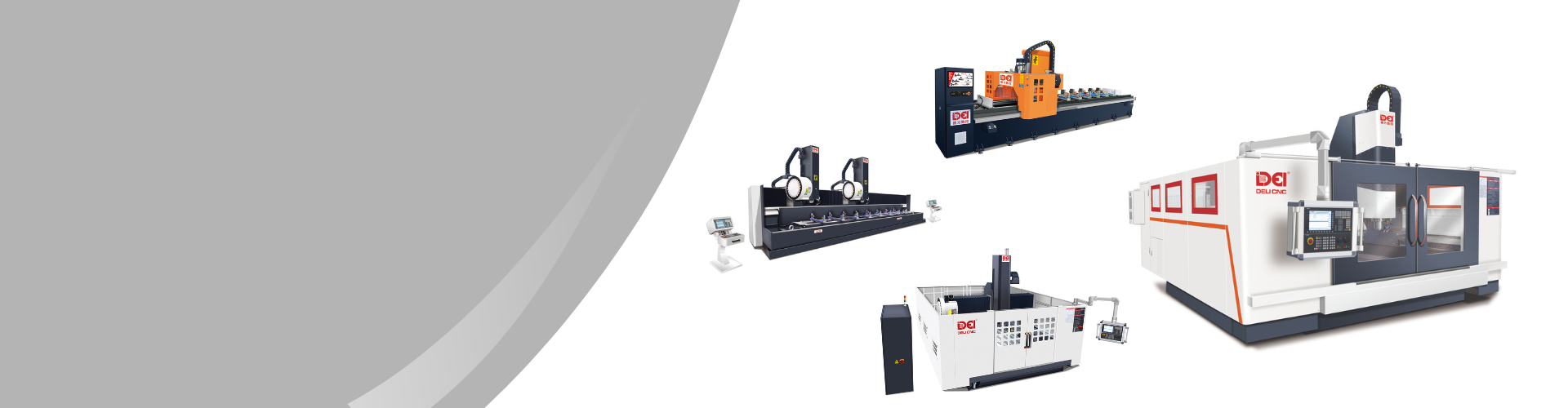
What Does CNC Stand For in Machining? A Beginner's Guide
CNC Explained: CNC stands for Computer Numerical Control, a technology that automates the manufacturing process.
How It Works: A computer directs a CNC machine to create parts from a digital design by removing material.
Key Components: Every CNC machine has a control unit, motors, and a mechanical structure to execute commands.
Versatile Technology: CNC machining is used on various materials, including metals, plastics, and wood.
Major Benefits: This process offers high precision, efficiency, and the ability to consistently replicate parts.
Common Machines: Popular types include milling machines, lathes, and plasma cutters, each serving unique functions.
Introduction
Have you ever wondered how the intricate metal parts in your phone or car are made? The answer often lies in CNC machining. CNC machining uses computer-controlled machines to cut precise, complex components from a block of material. The process shows up everywhere, from aerospace factories to the phone on your desk. This guide covers what CNC means, how it works, and what makes it so widely used.
Understanding CNC in Machining
So, what does CNC stand for in machining? CNC is an acronym for Computer Numerical Control. It refers to a manufacturing process where pre-programmed computer software dictates the movement of machinery and tools. Instead of a person manually controlling the equipment, a computer handles the movements with precision that would be hard to match by hand.
This method has become a fundamental part of modern manufacturing. A CNC machine can follow digital instructions to cut shapes that would be extremely difficult, or outright impossible, to produce by hand.
What Does CNC Mean in Manufacturing?
In the world of manufacturing, CNC means automation and precision. It signifies a shift from manual labor to a computer-driven manufacturing process. A CNC machine takes a digital design and uses numerical control to guide cutting tools, creating a physical part by removing material. This process, known as subtractive manufacturing, works with a wide range of materials.
Think of it like a highly skilled, automated sculptor. A computer program, typically generated as G-code by CAM software, tells the machine exactly where to move, how fast to cut, and what tool to use. This level of control ensures that each part is made to the exact specifications of the design.
Whether it's CNC milling a flat surface or cutting a complex 3D shape, the core principle is the same. Manufacturers rely on CNC to produce consistent, high-quality components, from airplane parts to medical implants.
The Role of CNC in Modern Industry
CNC technology has had a big impact on modern industry because it automates production and cuts down on human error. A CNC system delivers speed, accuracy, and consistency that manual methods can't match.
The technology matters because it enables mass production of complex parts with tight tolerances, which sectors like aerospace and automotive depend on. It also reduces human error, which means less scrap and more consistent quality.
The importance of CNC in modern manufacturing is clear when you consider its benefits:
Precision measured in micrometers.
Continuous 24/7 operation with minimal supervision.
Intricate geometries produced reliably on repeat.
Operators removed from the direct cutting zone.
A Brief History of CNC Machining
CNC technology predates the personal computer by decades. The earliest numerical control systems appeared in the 1940s, using motors to move existing machine tools according to preset coordinates. It was a big step away from purely manual operations.
Over the following decades, these early systems were upgraded with digital computers and later microprocessor-based controllers. The shift from hardwired logic to software-based control is what gave birth to CNC as we know it. Below are some of the key milestones.
The Evolution from Manual to CNC Machines
Before CNC, manual machining was the standard. Highly skilled operators would use levers, wheels, and buttons to guide a machine tool, shaping a workpiece by hand. This process required deep concentration, years of experience, and physical effort. It worked, but it was slow, and making two parts exactly the same was a real challenge.
The introduction of CNC changed that. Instead of manual guidance, a computer program directs the machine tool. A digital design file gets translated into a set of instructions, and the CNC machine follows those instructions to move the cutting tool along multiple axes.
A CNC machine can run complex three-dimensional cutting tasks in a single setup, at a level of precision and speed that manual machining simply can't reach.
Key Milestones in CNC Technology
From rudimentary punch-card systems to modern multi-axis machines, CNC technology has come a long way. The jump from NC to CNC was the turning point, because programs could be stored, edited, and run on digital computers instead of hardwired circuits.
| Milestone | Description |
|---|---|
| 1940s | John T. Parsons develops the first numerical control (NC) concepts, using motors and punched cards to automate machine tool positioning. |
| 1950s | MIT's Servomechanisms Laboratory demonstrates the first successful NC machine tool (1952), a Cincinnati Hydrotel milling machine, paving the way for commercial applications. |
| 1960s | Early digital computers and minicomputers are integrated into machine tool controls, enhancing flexibility and capability. |
| 1970s | The widespread adoption of microprocessors drives the rapid growth of true CNC systems, making programming far more flexible and accessible. |
| 1980s+ | Advancements in software (CAD/CAM), processing power, and multi-axis machines expand CNC capabilities exponentially. |
Main Parts and Components of a CNC Machine
A CNC machine can look like a complicated tangle of wires and metal at first glance. Underneath, though, most CNC machine tools are built around the same core components.
Most CNC machine tools consist of a control unit (the brain), motors and drives (the muscles), a mechanical structure (the skeleton), and a cutting tool or other processing head (the hands). Here's what each one does.
The Control Unit
The control unit is the brain of the entire CNC system. It is essentially a dedicated computer that reads the program instructions (G-code) and translates them into electrical signals that command the machine's motors and other components. This unit interprets the digital design and orchestrates the physical movements required to create the part.
Modern control units run on dedicated computer software that can handle complex calculations and make real-time adjustments. They process the code line by line, coordinating spindle speed, tool position, and coolant flow so everything happens in the right order.
The control unit is responsible for several critical functions, including:
Reading and processing G-code from the CAM software.
Sending signals to drive motors to move the tool and/or workpiece along each axis.
Managing spindle speed, coolant flow, and tool changes.
Motors, Drives, and Mechanical Structure
If the control unit is the brain, the motors and drives are the muscles. These components receive signals from the controller and provide the power to move the machine's axes. Most modern CNC machines use servo motors with built-in feedback, so the controller always knows the exact position of each axis.
These motors are connected to the mechanical structure of the machine—the rigid frame, guides, and lead screws that support the workpiece and cutting tool. The quality and rigidity of this structure are critical for accuracy. Any vibration or flex can compromise the precision of the final part.
Together, these components form the motion system of the CNC machine. The controller sends commands, the motors provide the power, and the mechanical structure keeps everything moving smoothly along the programmed path.
Cutting Tools and Workholding Devices
The cutting tool is where the action happens. It directly contacts the workpiece to remove material. There's a wide range of cutting tools, each designed for a specific material and operation, and choosing the right one makes a big difference in surface finish and accuracy.
Common types of cutting tools include end mills for creating flat surfaces and pockets, drill bits for making holes, and specialized tools for threading or engraving. These tools are typically made from very hard materials like carbide or high-speed steel to withstand the forces and heat of cutting. For specialized applications, tools made from ceramic or even diamond-coated materials are also available.
Just as important as the cutting tool are the workholding devices, which securely fasten the workpiece to the machine. These devices, such as vises, clamps, or custom fixtures, must hold the material rigidly in place to prevent it from moving during the machining process. Proper workholding is essential for safety and accuracy.
End mills, face mills, drill bits, and taps are common cutting tools.
Workholding devices like vises, chucks, clamps, and fixtures keep the material locked in place.
Common CNC Acronyms and Terminology
CNC machining comes with its own vocabulary. Beyond CNC itself, the terms you’ll hear most are CAD, CAM, and G-code. These abbreviations map to the main stages of the workflow, from design to machine instructions.
CNC, CAD, CAM, and G-Code Explained
The CNC workflow starts with an idea and ends with a set of machine instructions. CAD and CAM software bridge the gap between design and manufacturing.
First, a designer creates a 2D or 3D model using CAD software, which defines the part's geometry, dimensions, and tolerances. The finished design then goes to CAM software, which figures out the best tool paths, cutting speeds, and other machining parameters.
The output of the CAM software is G-code, a language the CNC machine's controller reads. It consists of alphanumeric commands that direct every movement of the machine.
CAD (Computer-Aided Design): software for creating digital part models.
CAM (Computer-Aided Manufacturing): software that converts CAD models into machining instructions.
G-code: the programming language that controls CNC machine movements.
CNC (Computer Numerical Control): using a computer to control a machine tool.
Other Essential Machining Terms
Beyond the main acronyms, there are a few more terms you'll run into when talking to machinists or reading job quotes.
A "part program" is the complete set of G-code instructions needed to produce a single part. Tool paths are the specific routes the cutting tool follows to shape the material.
Feed rate: how fast the tool moves into or across the material (mm/min or in/min).
Spindle speed: rotational speed of the tool, measured in RPM.
Depth of cut: how much material is removed in a single pass.
Tolerance: the acceptable range of variation in a part's dimensions.
Why CNC Machining is Important
CNC machining matters because it produces parts with precision, speed, and complexity that manual methods can't match. It also reduces human error, which leads to better quality and less waste.
Because the cutting is computer-controlled, every part comes out the same as the last one. That consistency is a big deal in industries where reliability is non-negotiable.
Advantages Over Manual Machining
The biggest advantage of CNC over manual machining is consistency. Once a program is proven out, the machine can run it thousands of times with identical results. A skilled manual machinist can produce excellent work, but matching the same dimensions on the 50th part as on the 1st is hard. CNC handles that without breaking a sweat.
Automation also cuts labor costs. One operator can oversee several CNC machines at once, while manual machining ties up one person per machine. That opens the door to "lights-out" manufacturing, where machines run overnight unattended.
CNC machines come out ahead in a few key areas:
Consistency: every part matches the same specs.
Speed: automated cutting is much faster than manual operation.
Complexity: geometries that would be nearly impossible by hand are routine on CNC.
Safety: operators aren't standing next to spinning tools.
Precision, Efficiency, and Repeatability
Precision means the machine can hit tight tolerances, often measured in micrometers, that would be nearly impossible to hold by hand. Efficiency comes from automation: a CNC machine runs faster than a person can crank handles, and reduced setup times let shops turn parts around quickly. Repeatability means the last part in a batch of 10,000 is the same as the first.
Precision: tolerances measured in micrometers, beyond what manual machining can hold.
Efficiency: less downtime, faster cycle times, and the ability to run multiple machines at once.
Repeatability: part 1 and part 10,000 come out the same.
Beginner’s Guide: Getting Started with CNC Machining
If you want to try CNC machining yourself, getting started is more accessible than you might think. Whether you're a hobbyist, an entrepreneur, or a student, the barrier to entry is lower than it used to be.
You'll need some basic equipment, software, and an understanding of safety. The sections below walk through what to get and where to learn more.
What You Need: Equipment, Software, and Safety Gear
The obvious starting point is the CNC machine itself. For beginners, a desktop CNC router or mill makes sense. These smaller machines cost less and are easier to learn on than full-size industrial equipment.
On the digital side, you will need software. This starts with CAD software to create your 2D or 3D designs. Many free or low-cost options are available for beginners. Next, you'll need CAM software to generate the toolpaths and G-code for your machine. Some CNC machines come with integrated software that handles both CAD and CAM functions.
Most importantly, never overlook safety. Machining creates dust, noise, and flying debris, and involves fast-moving, sharp tools. Proper safety gear is not optional; it's essential.
A desktop CNC machine (mill or router) to start.
CAD software for design and CAM software for programming.
Safety glasses, hearing protection, and appropriate respiratory protection (dust mask for wood/plastic, respirator for metalworking).
Softer materials like wood or plastic to practice on before moving to metal.
Learning Resources for Beginners
The fastest way to learn CNC is hands-on practice, but good resources help you avoid common mistakes.
YouTube and forums are good places to start. You can watch tutorials, see how others handle projects, and ask questions. Many creators also share their design files so you can learn by modifying existing projects.
For more structured learning, online courses or local maker spaces are worth looking into.
YouTube has thousands of CNC tutorials, from beginner walkthroughs to advanced techniques.
Reddit's r/CNC is a good forum for asking questions and getting advice.
Sites like Udemy and Coursera offer structured courses on CAD, CAM, and CNC operation.
Local maker spaces often have CNC machines available and run introductory workshops.
Step-by-Step Guide to CNC Machining
Here’s how a CNC project actually runs, from digital file to finished part.
The process follows five main steps: design, programming, machine setup, cutting, and inspection.
Step 1: Creating a Design with CAD Software
The first step is creating a digital design using CAD (Computer-Aided Design) software. This can be a 2D drawing or a 3D model that captures all the geometric information: dimensions, curves, and angles.
One thing to keep in mind during design is Design for Manufacturability (DFM). For example, sharp internal corners are difficult to machine because most cutting tools are round, and thin walls can cause problems during cutting. A clean, DFM-aware design saves time and money later.
Build the 2D or 3D model in CAD software.
Include all necessary dimensions and tolerances.
Apply DFM principles to keep the design practical to machine.
Step 2: Preparing the CNC Program (CAM & G-Code)
Once you have a CAD model, CAM (Computer-Aided Manufacturing) software generates the machine instructions. You import the CAD file, then choose cutting tools, set spindle speeds and feed rates, and generate the toolpaths. Most CAM programs include a simulation mode so you can spot collisions or errors before cutting anything real.
When the strategy checks out, the CAM software outputs the toolpaths as G-code. This file is what the CNC machine runs.
Import the CAD file into CAM software.
Generate toolpaths that define how the tool will cut the part.
Export the toolpaths as G-code for the machine.
Step 3: Setting Up the Machine and Workpiece
With the program ready, it's time to set up the physical machine. First, clamp the raw material (the workpiece) to the machine bed using a vise or other workholding device. Next, load the correct cutting tool into the spindle, or load multiple tools into the automatic tool changer if the job requires them.
Then set the "zero" point, also called the origin. This tells the machine where the starting reference point is on the workpiece, so all programmed movements are calculated from the right position. Material type also matters here, since it affects the cutting parameters you may need to adjust.
Clamp the workpiece firmly to the machine bed.
Load the cutting tool into the spindle.
Set the X, Y, and Z zero points on the workpiece.
Step 4: Running the CNC Machine
With the machine set up and the program loaded, it's good practice to do a "dry run" first. This means running the program with the tool raised above the workpiece so you can visually confirm the machine moves look right before any cutting starts.
Once everything checks out, press start. The spindle spins up, coolant starts flowing if needed, and the machine moves the tool along the programmed path, cutting away material to form the part.
Even though the process is automated, the operator should still keep an eye on things. Listen for unusual sounds, watch for tool wear, and be ready to stop the machine if something looks off.
Step 5: Inspecting and Finishing the Part
When the machine finishes, the part still needs cleaning and inspection. Remove it from the machine, clear off the cutting fluid and chips, and measure the critical dimensions against the CAD drawing. Tools like calipers, micrometers, and coordinate measuring machines (CMMs) are standard for this step.
Some parts also need post-processing, depending on what they're for.
Deburring removes sharp edges left over from machining.
Surface finishing (bead blasting, polishing, anodizing) improves appearance and texture.
Final inspection verifies all dimensions fall within the specified tolerance.
Applications of CNC Machining
CNC machining shows up across almost every corner of manufacturing. From large industrial components to tiny, intricate parts, if it can be designed on a computer, a CNC machine can probably make it. Different machine types handle different tasks and materials.
Metalworking and Fabrication
CNC is used heavily in metal fabrication. A CNC milling machine uses a rotating cutting tool to carve features into a block of aluminum, steel, or titanium. CNC lathes handle cylindrical parts. CNC plasma and laser cutters slice through sheet metal quickly and accurately. CNC press brakes bend sheet metal to precise angles.
Milling creates slots, holes, and complex 3D contours.
Turning machines cylindrical components like shafts and pins.
Lasers, plasma torches, and waterjets cut profiles from sheet metal.
CNC press brakes bend sheet metal to precise angles.
CNC in Other Industries (Aerospace, Automotive, Medical)
CNC also shows up in specialized sectors where part accuracy directly affects safety.
In aerospace, CNC produces turbine blades, structural frames, and other lightweight components where dimensional accuracy is critical. The automotive industry uses it for engine blocks, transmission parts, and suspension components. The medical field relies on CNC for custom implants (hip and knee replacements), surgical instruments, and prosthetic limbs. Even consumer electronics use CNC; Apple, for instance, machines unibody aluminum laptop enclosures on CNC mills.
Aerospace: structural parts, engine components, fixtures.
Automotive: engine blocks, transmission parts, suspension components.
Medical: custom implants (hip, knee), surgical tools, prosthetics.
Electronics: enclosures for phones, laptops, and other devices.
Conclusion
CNC machining has been the backbone of precision manufacturing for over half a century, and it's not going anywhere. Whether you're running a job shop, prototyping a new product, or just getting started with a desktop machine in your garage, the fundamentals are the same: CAD model, CAM program, set up the machine, cut the part, and inspect.
If you're ready to put these ideas into practice, or and we'll help you find the right setup for your work.
FAQs
Can you explain what a CNC machine does in simple terms?
Think of a CNC machine as a robot sculptor. You give it a digital design file, and it uses motorized cutting tools to carve a block of material into that exact shape — automatically, with no manual cranking or lever-pulling required. The result is a physical part that matches your digital blueprint down to fractions of a millimeter.
What are the main parts of a CNC machine?
Every CNC machine tool has four core systems: the control unit (a dedicated computer that reads G-code instructions), the motors and drives (servo or stepper motors that move the axes), the mechanical structure (the rigid frame, guides, and ball screws), and the cutting tool (end mills, drills, or other tooling that removes material). Together, they translate a digital design into a physical part.
Is CNC machining only used for metals?
Not at all. While CNC is widely associated with metalworking, it works on a broad range of materials including aluminum, steel, and titanium as well as plastics (acrylic, nylon, PEEK), hardwood and MDF, foam, wax, and composite materials like carbon fiber. The key is selecting the right spindle speed, feed rate, and cutting tool for each specific material.
What are the advantages of CNC machining over manual machining?
CNC machining delivers higher precision (tolerances as tight as ±0.01 mm or better), greater speed (complex parts can be machined in a single setup), and perfect repeatability (the 100th part is identical to the 1st). It also reduces human error, allows a single operator to manage multiple machines, and enables "lights-out" production where machines run unattended overnight — all of which lower long-term manufacturing costs.
How accurate is CNC machining?
Typical CNC milling and turning hold tolerances of ±0.01 mm to ±0.05 mm (10–50 micrometers) under standard conditions. With precision equipment and careful setup, tolerances of ±0.005 mm (5 micrometers) are achievable, and specialized grinding or jig boring processes can reach ±0.001 mm (1 micrometer) or better. The actual accuracy depends on the machine quality, tool condition, material, and environmental factors like temperature.
What is the difference between CNC milling and CNC turning?
CNC milling uses a rotating cutting tool that moves along multiple axes to remove material from a stationary workpiece — ideal for flat surfaces, pockets, slots, and complex 3D contours. CNC turning (performed on a CNC lathe) rotates the workpiece while a stationary cutting tool removes material — best for cylindrical or conical parts like shafts, pins, and bushings. Many modern machines combine both functions in a single mill-turn center